DIC Parameters
The DIC Parameters section of the Processing page holds the settings you need for almost every run: the resolution the correlation runs at, the window size, and the optional velocity. It is open by default, and sensible defaults apply to everything else. Rarely needed settings are in the collapsed Advanced options below it.
The settings map to the batch and dic_params sections of the YAML config and are shared by all pairs of a batch run.
Click a letter to see what a setting does.
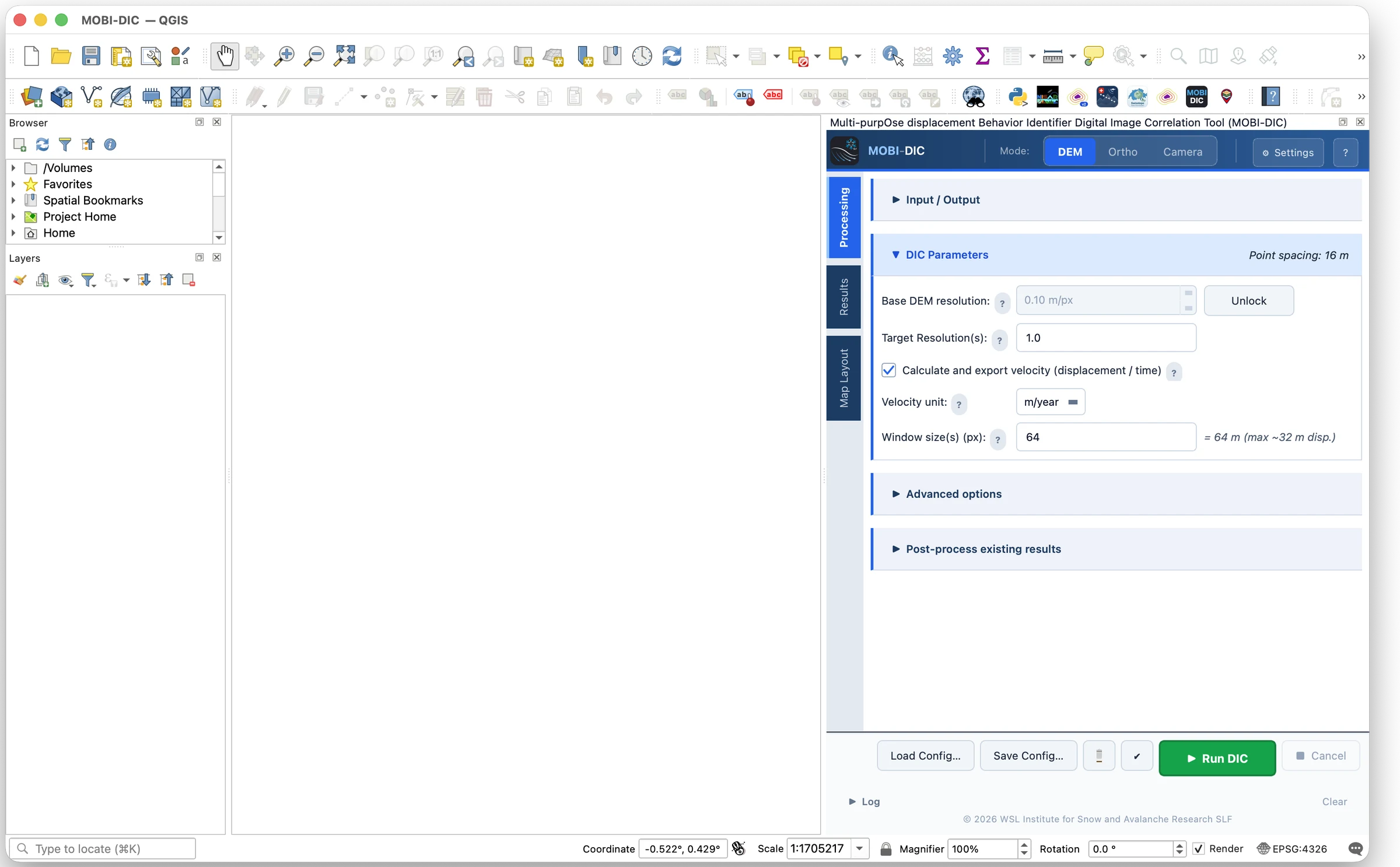
The typical setup takes three steps:
- Check the base resolution. It is read from the primary file as soon as you set it in Input / Output.
- Set the target resolution and the window size. Comma-separated lists run several combinations in one batch.
- Open the Advanced options only if you need to change something else, for example the correlation feature or the output files.
| Parameter | Default | What it does |
|---|---|---|
| Base resolution | read from the file | The native ground sampling distance of your input. It is locked because it comes from the file. Press Unlock only if it was not read correctly. It unlocks by itself when it cannot be read, for example for a geographic CRS in degrees. In Camera mode it is fixed at 1 px/px. If the pixel size differs between X and Y, a note shows the real size per axis. In a time series the base resolution is a single value for all pairs; the pixel size of each pair's first image is read from its file, so pairs with a different resolution (for example 0.25 m in one year and 0.1 m in the next) are resampled to the same target resolution. |
| Target resolution(s) | 1 |
The output resolution in m/px (DEM, Ortho) or px/px (Camera). The input is resampled to it before the correlation. A value equal to the base resolution runs at native scale, a larger one downsamples first. Several values give one run each. |
| Export velocity | off | Also write velocity rasters: the displacement divided by the time between the two dates, which are read from the file names. The velocity layers are written next to each displacement component. |
| Velocity unit | m/year |
m/year or m/day (px/year or px/day in Camera mode). Only shown when the velocity export is on. |
| Window size(s) (px) | 64 (DEM, Camera), 8 (Ortho) |
The side length of the correlation window in pixels. Larger windows are more robust against noise but give coarser detail. Several values give one run each. A note shows the window size on the ground (window size × target resolution) and a rule-of-thumb maximum displacement of half that size. A shift much larger than that cannot be located reliably. |
| Image alignment (Camera only) | crop |
What to do when the two images differ in size. crop trims both to the common top-left area, pad pads the smaller one with zeros. |
Choosing the window size and the resolution
- The window should be at least 2 to 3 times the largest displacement you expect, in pixels at the chosen resolution. A smaller window gives noise and aliasing, a larger one loses spatial detail.
- Start at native resolution (
1). Add a coarser one, for example1, 2, only if the run is slow or the signal is weak at native scale. - For DEMs with 1 m resolution, a window of 64 covers a 64 m patch and resolves displacements from a few centimetres to tens of metres.